Building AWS Lambda Functions with CDK L2 Constructs — Part II

Manoj Kengudelu
Author

Photo courtesy of Pexels
In our previous exploration of CDK property classes, we built a DynamoDB table for our serverless product catalog. Now it’s time to bring that data to life with a Lambda function that can retrieve and serve our products through a web endpoint. This journey will reveal both the power and the pitfalls of serverless development with CDK.
The Lambda Function: Simple Yet Powerful
Let’s start with our Lambda function code. Create a new folder called lambda_src in your project root and add this Python function:
import json
import os
import logging
import boto3 # AWS Python SDK

# Configure logging
logger = logging.getLogger()
logger.setLevel(logging.INFO)

# Initialize the DynamoDB client
dynamodb_client = boto3.client('dynamodb')

def lambda_handler(event, context):
    '''
    Returns all products from the DynamoDB table provided.

    Environment variables:
        - TABLE_NAME: The name of the DynamoDB table scanned.
    '''

    logger.info(f"Received event: {json.dumps(event, indent=2)}")

    # Scan the DynamoDB table to get all products
    products = dynamodb_client.scan(
        TableName=os.environ['TABLE_NAME']
    )

    return {
        "statusCode": 200,
        "body": json.dumps(products['Items'])
    }
This function does three simple things:
- Logs the incoming event for debugging purposes
- Scans the DynamoDB table specified in the TABLE_NAME environment variable
- Returns the results as a JSON response with proper HTTP status codes
Setting Up Dependencies
Before we can use this function, we need to add the AWS SDK(boto3) to our project dependencies. Update your requirements.txt:
aws-cdk-lib>=2.0.0
constructs>=10.0.0
boto3>=1.26.0
Install the new dependency:
source .venv/bin/activate
pip install -r requirements.txt
Building the Lambda Function with CDK
Now for the exciting part — deploying our function with CDK. The L2 Lambda construct makes this surprisingly straightforward:
from aws_cdk import (
    RemovalPolicy,
    Stack,
    aws_dynamodb as dynamodb,
    aws_lambda as lambda_
)
from constructs import Construct

class ServerlessAppStack(Stack):

    def __init__(self, scope: Construct, construct_id: str, **kwargs) -> None:
        super().__init__(scope, construct_id, **kwargs)


        #You can either provide an instance of the Attribute class as partition_key
        products_table = dynamodb.Table(self, "ProductsTable",
                                        partition_key=dynamodb.Attribute(
                                            name='id',
                                            type=dynamodb.AttributeType.STRING
                                        ),
                                        billing_mode=dynamodb.BillingMode.PAY_PER_REQUEST,
                                        removal_policy=RemovalPolicy.DESTROY)

        product_list_function = lambda_.Function(self, "ProductListFunction",
                                                 code=lambda_.Code.from_asset("lambda_src"),
                                                 handler="product_list_function.lambda_handler",
                                                 runtime=lambda_.Runtime.PYTHON_3_10,
                                                 environment={
                                                     "TABLE_NAME": products_table.table_name
                                                 })

        #We will configure a Lambda function URL to trigger it from the Internet and see what it returns.
        product_list_url = product_list_function.add_function_url(auth_type=lambda_.FunctionUrlAuthType.NONE)
Understanding the Lambda Configuration
Let’s break down each parameter:
Code Source
code=lambda_.Code.from_asset("lambda_src")This tells CDK to package everything in the lambda_src folder as an S3 asset. During deployment, CDK automatically uploads this code to S3 and configures the Lambda function to use it.
Handler Definition
handler="product_list_function.lambda_handler"This follows the pattern filename.method_name. Since our function is in product_list_function.pyand the entry point is lambda_handler, we get product_list_function.lambda_handler.
Runtime Selection
runtime=lambda_.Runtime.PYTHON_3_10CDK provides enum values for all supported Lambda runtimes, ensuring type safety and preventing deployment errors from typos.
Environment Variables
environment={"TABLE_NAME": products_table.table_name}This creates a direct reference between our Lambda function and DynamoDB table, using the actual table name generated by CDK.
Adding Internet Access with Function URLs
One of the most elegant features of L2 constructs is how they provide convenience methods for common patterns. Adding a Function URL is just one method call:
# Adding a Lambda URL to execute the function from the Internet
product_list_url = product_list_function.add_function_url(
    auth_type=lambda_.FunctionUrlAuthType.NONE
)
This single line of code:
- Creates a public HTTPS endpoint
- Configures the necessary permissions
- Returns a URL object you can reference elsewhere
The Asset Management Magic
When you deploy this stack, you’ll notice something interesting in your cdk.out folder:
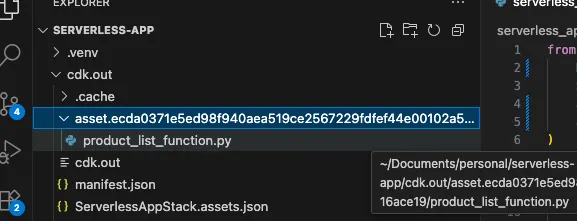
CDK automatically:
- Packages your Lambda code into a deployment artifact
- Uploads it to S3 during deployment
- References the S3 location in the CloudFormation template
This asset management system is one of CDK’s most powerful features, eliminating the manual zip-and-upload process traditional Lambda deployment requires.
The Permission Problem: A Learning Moment
Let’s deploy our function and see what happens:
cdk deploy
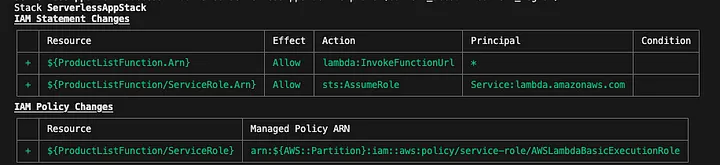
CDK will show you the IAM permissions it’s creating and ask for approval. After deployment, try accessing your function URL,
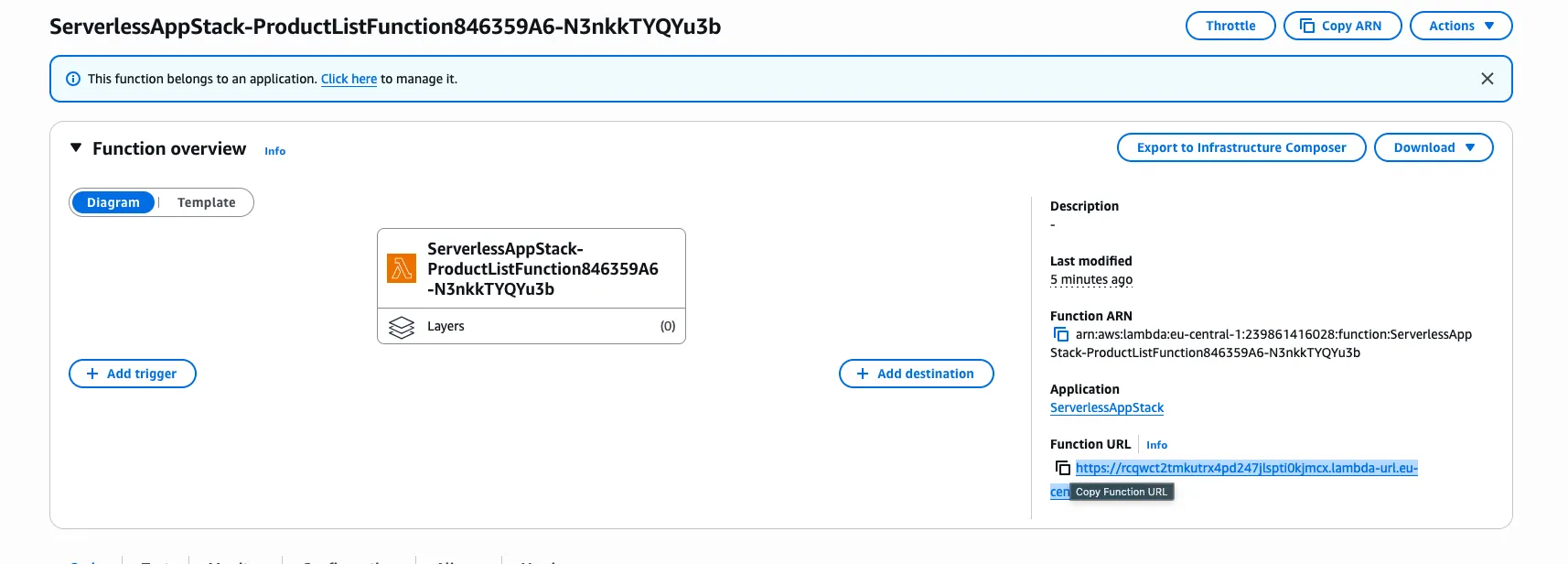
and you’ll likely encounter this error:

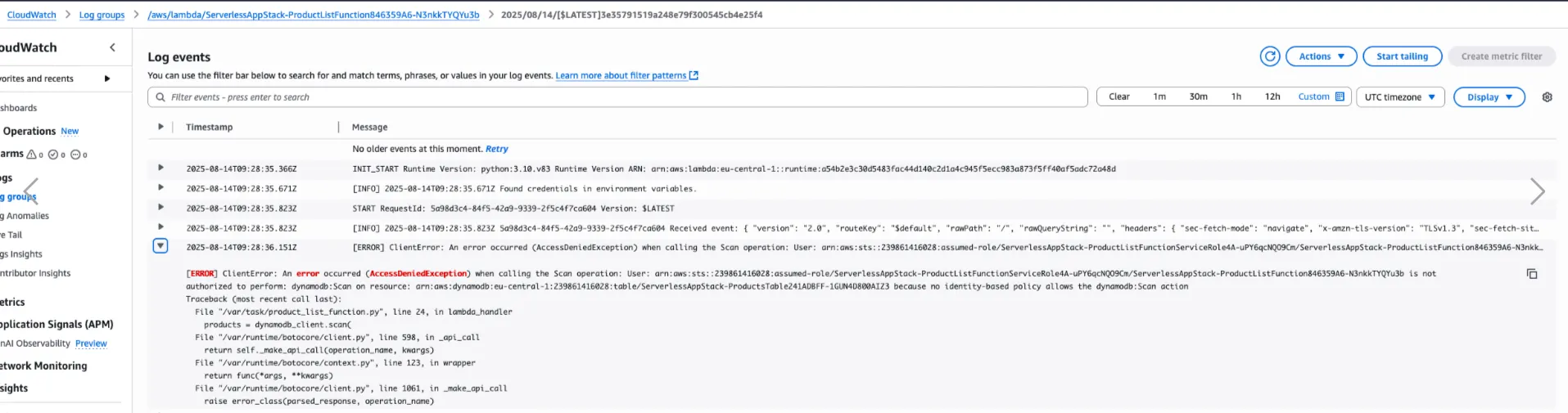
This is exactly what we want to see! It demonstrates a crucial serverless security principle: AWS follows the principle of least privilege by default.
Why This Error Is Actually Good News
This permission error illustrates several important concepts:
1. Automatic IAM Role Creation
CDK automatically created an IAM service role for our Lambda function, but it only includes basic Lambda execution permissions.
2. Security by Default
AWS doesn’t grant broad permissions automatically. Each service interaction must be explicitly authorized.
3. The Need for Granular Permissions
Our Lambda function needs specific permission to scan our specific DynamoDB table.
The L2 Construct Advantage
This is where L2 constructs truly shine. Instead of manually crafting IAM policies, CDK provides methods that grant exactly the permissions needed:
# Grant the Lambda function read access to the DynamoDB table
products_table.grant_read_data(product_list_function)- Creates the appropriate IAM policy statements
- Attaches them to the Lambda function’s role
- Follows AWS security best practices
- Grants only the minimum required permissions
Testing the Complete Solution
After adding the permission grant and redeploying:
cdk deployYour function URL should now return:
[
  {
    "id": {"S": "car"},
    "name": {"S": "ferrari"}
  },
  {
    "id": {"S": "pgm"},
    "name": {"S": "python"}
  }
]
Key Takeaways
L2 Constructs Provide Rich APIs
Methods like add_function_url() and grant_read_data() encapsulate complex AWS patterns into simple method calls.
Asset Management Is Automated
CDK handles code packaging, uploading, and versioning automatically.
Security Requires Intentionality
Permission errors aren’t bugs — they’re features that force you to be explicit about access patterns.
Environment Variables Enable Loose Coupling
Passing resource names through environment variables keeps your code portable and testable.