Creating AWS Cognito User to Authenticate Postman Requests

Manoj Kengudelu
Author

Photo courtesy of Dan Nelson on Unsplash
Introduction
We have an API automation test suite in Postman that covers 20+ endpoints. We faced a challenge when we needed to use a user created in the Cognito User Pool exclusively for authentication to execute our test suite. Since these tests run in our deployment pipeline — right after the backend deployment — it was crucial to find a reliable solution.
Solution
We use the Cognito endpoint to generate an auth token, which is then used in subsequent requests.
Step 1: Create User
Let’s create a user in Cognito.
import time

import boto3


def create_cognito_user(user_pool_id, username, temporary_password, user_attributes):
    client = boto3.client('cognito-idp')

    response = client.admin_create_user(
        UserPoolId=user_pool_id,
        Username=username,
        TemporaryPassword=temporary_password,
        UserAttributes=user_attributes,
        MessageAction='SUPPRESS'  # To suppress sending the welcome email
    )
    time.sleep(5)

    response = client.admin_set_user_password(
        UserPoolId=user_pool_id,
        Username=username,
        Password=temporary_password,
        Permanent=True
    )

    return response


if __name__ == "__main__":
    user_pool_id = 'eu-central-test' # Change this to correct user pool id
    username = 'api-test-user' # Change username to a unique value
    temporary_password = 'i63nhN^&NQKbM1xh' # Change this
    user_attributes = [
        {"Name": "email", "Value": "[email protected]"},
        {"Name": "email_verified", "Value": "true"},
        {"Name": "family_name", "Value": "User"},
        {"Name": "given_name", "Value": "API Test"},
        {"Name": "address",
         "Value": "{\"street_address\":\"Test Str. 11\",\"locality\":\"Berlin\",\"postal_code\":\"12683\"}"},
        {"Name": "gender", "Value": "Herr"},
        {"Name": "custom:company_name", "Value": "Test Firma"},

    ]

    response = create_cognito_user(user_pool_id, username, temporary_password, user_attributes)
    print(response)
You can adjust the user attributes based on your requirements.
Step 2: Integrate User
To integrate the user created in the Cognito User Pool into our system, we trigger an event to create the user record.
To achieve this, create a Lambda function that listens for the event and consumes it accordingly. Then, trigger the function using the following test data:
{
  "source": "cognito",
  "detail-type": "userCreation",
  "detail": {
    "id": "<User ID (Sub) created from above action>",
    "email": "[email protected]",
    "firstName": "API Test",
    "lastName": "User",
    "salutation": "Herr",
    "username": "api-test-user",
    "identityProvider": "Third Party",
    "street": "Test Str. 11",
    "city": "Berlin",
    "postalCode": "12683",
    "companyName": "Test Firma",

  }
}
The above action creates a user record in the database, which is now ready to interact with other tables for CRUD operations.
Step 3: Set Up Postman
We can configure the username, password, and the specific Cognito User Pool client_id as Postman environment variables.
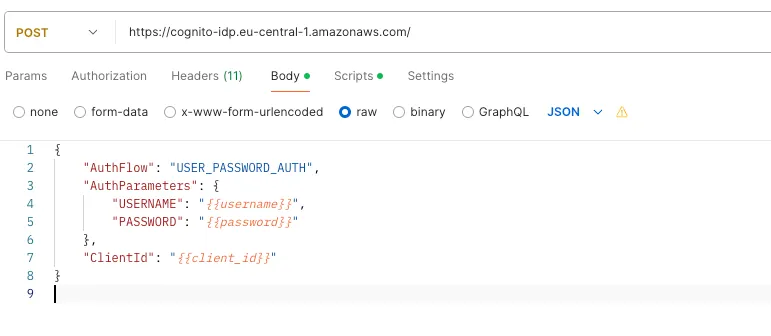
This POST request generates an AuthenticationResult, which includes the AccessToken.
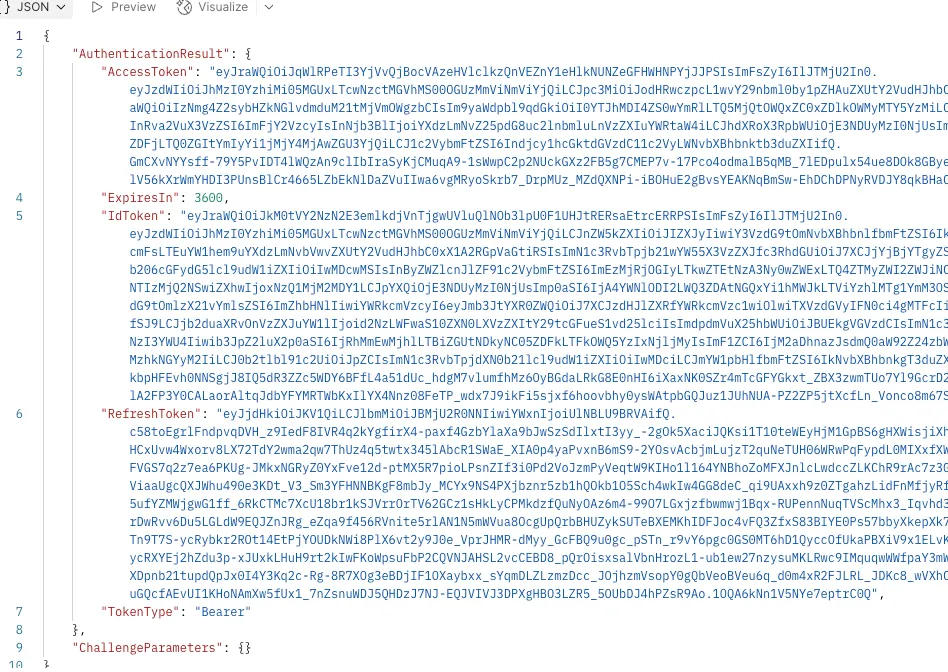
Eventually, we can use the AccessToken to authenticate subsequent requests in Postman.