How to Use Property Classes to Configure CDK Constructs — Part I

Manoj Kengudelu
Author

Photo courtesy of Unsplash
When working with AWS CDK, you’ll quickly discover that L2 constructs make complex AWS architectures much more manageable by encapsulating configuration according to best practices. But what happens when you need to provide more complex details than simple string or number values? This is where CDK property classes become essential.
Understanding CDK Property Types
While basic CDK properties accept scalar values like strings, numbers, and booleans, many constructs require more sophisticated configuration objects. Let’s explore this by building a simple serverless application with a DynamoDB table.
Building Our Serverless Application
We’ll create a practical example: a serverless application with a DynamoDB table to store products. This foundation will later support a Lambda function that scans items and returns them via a function URL.
Setting Up the Project
First, create your project structure:
mkdir serverless_app
cd serverless_app_cdk
cdk init app -l python
Activate your virtual environment and install dependencies:
from aws_cdk import (
    RemovalPolicy,
    aws_dynamodb as dynamodb,
)
Understanding CDK Property Types
let’s examine the different types of properties we will encounter
1. Scalar Properties
These are straightforward values:
- Boolean:
deletion_protection=True - Numeric:
read_capacity=5 - String:
table_name="MyTable"
2. Enumeration Types
Enums ensure you use valid values. For example, BillingMode offers predefined options like PAY_PER_REQUEST or PROVISIONED. PAY_PER_REQUEST enumeration member will provide the value for the pay-per-request configuration for billing mode during the synthesis.
3. Struct Types (Interfaces)
These are complex data structures with multiple properties. The Attribute class is a perfect example, requiring both a name and type specification.
4. Cross-Package Interfaces
Some properties reference interfaces from other CDK packages, like IKey from the aws_kms package for encryption keys.
Implementing the DynamoDB Table
class ServerlessAppStack(Stack):
    def __init__(self, scope: Construct, construct_id: str, **kwargs) -> None:
        super().__init__(scope, construct_id, **kwargs)

        # Create DynamoDB table with property classes
        products_table = dynamodb.Table(
            self, "ProductsTable",
            partition_key=dynamodb.Attribute(
                name="id",
                type=dynamodb.AttributeType.STRING
            ),
            billing_mode=dynamodb.BillingMode.PAY_PER_REQUEST,
            removal_policy=RemovalPolicy.DESTROY
        )
Key Configuration Decisions
Billing Mode
By default, DynamoDB tables use PROVISIONED mode. Since our application won't receive consistent requests, we configure it as PAY_PER_REQUEST for cost-effectiveness.
Partition Key
Instead of providing a simple string, we use the Attribute class to specify both the key name ("id") and its data type (STRING). Refer Here. There is also a second option, which is ‘Dictionary’. It means you can also provide the parameters of the Attribute class as a Python dictionary instead of initializing it.
Removal Policy
The RemovalPolicy.DESTROY enum ensures our table gets deleted when we tear down the stack, preventing orphaned resources.
Python-Specific Considerations
When working with CDK in Python, you have flexibility in how you provide complex properties:
- Class Instances (Recommended)
- Dictionary Syntax
I recommend using class instances for better readability and IDE support.
Deploying and Testing
cdk deploy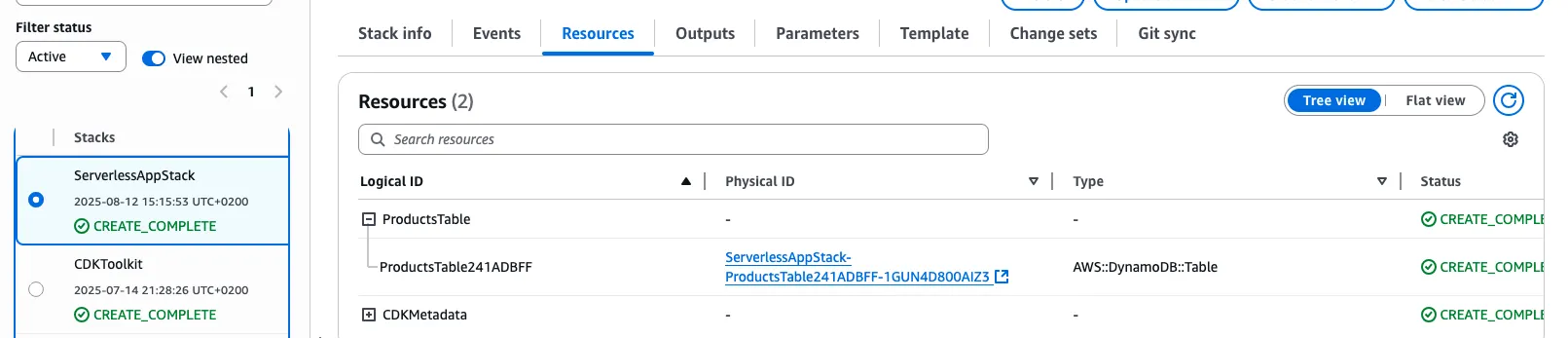
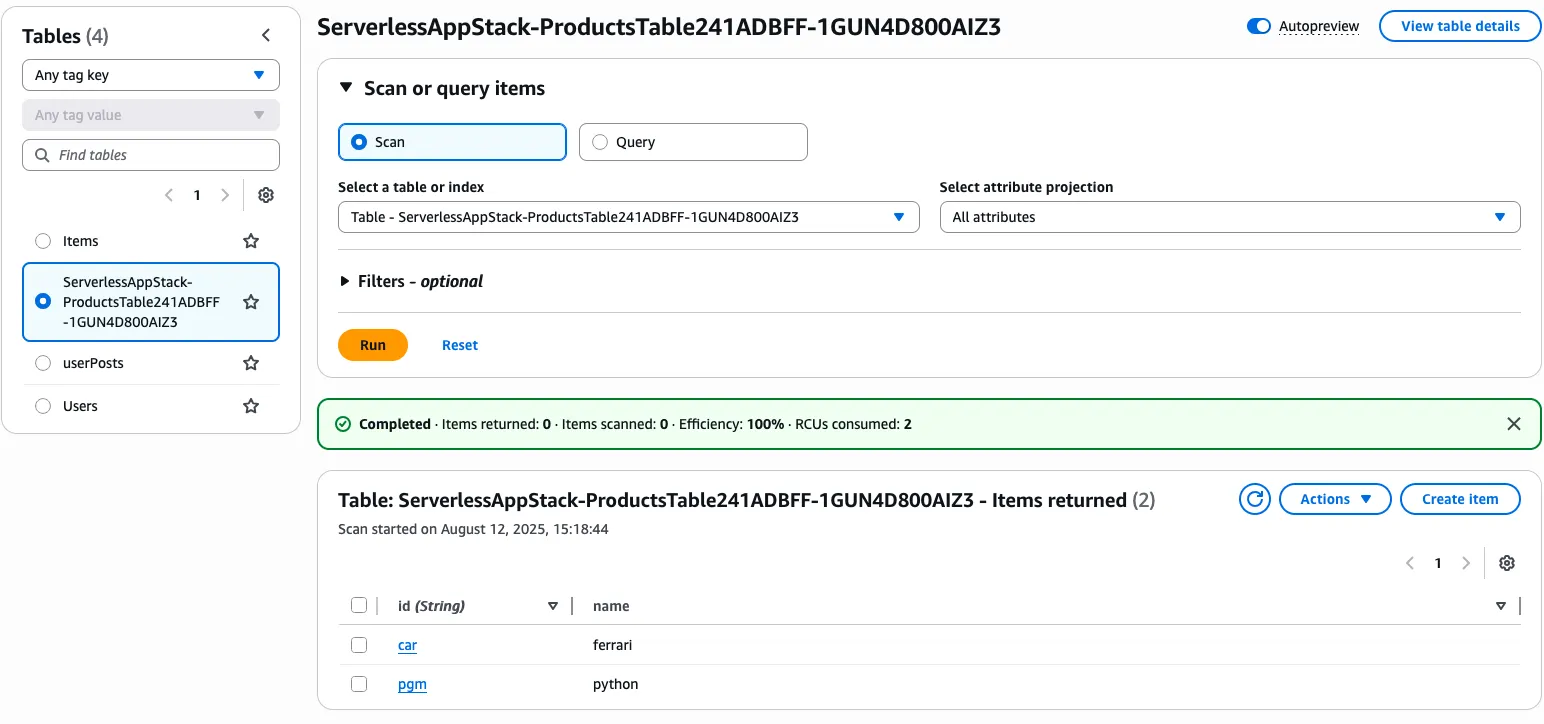
Once deployed, you can test your table by adding sample data through the AWS Console:
- Item 1:
id="car",name="ferrari" - Item 2:
id="pgm",name="python"
The Power of L2 Constructs
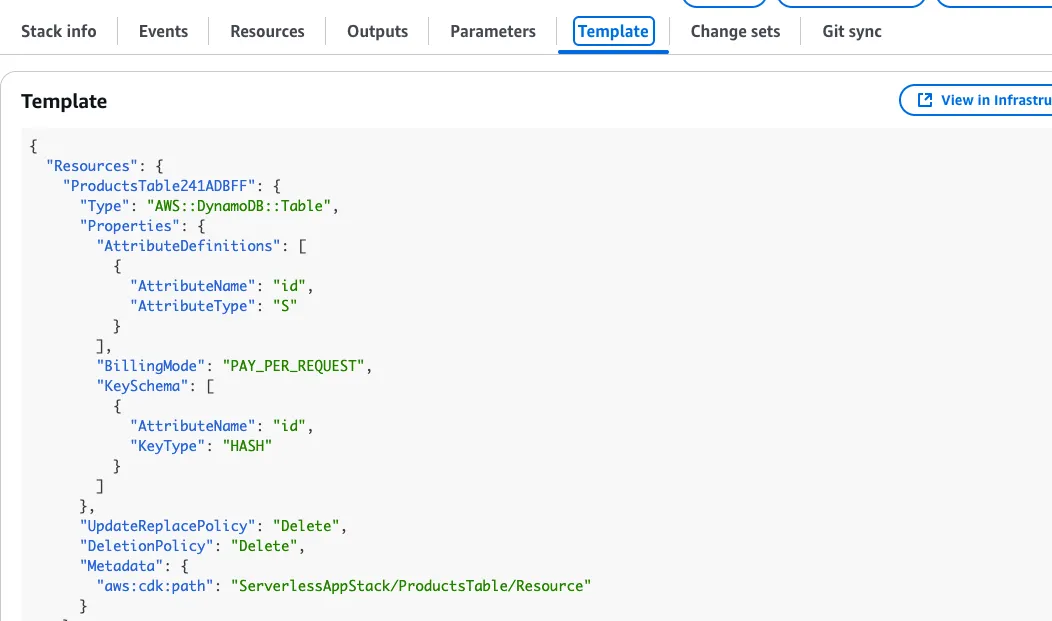
Notice how the CDK automatically handled complex CloudFormation configuration for us:
- The partition key appears in both KeySchema and AttributeDefinitions
- UpdateReplacePolicy and DeletionPolicy attributes are automatically added
- Best practices are applied by default
This demonstrates why L2 constructs are so powerful — they eliminate repetitive configuration while ensuring AWS best practices.
What’s Next?
This DynamoDB table forms the foundation for a complete serverless application. In upcoming implementations, we’ll add following in Part-II:
- An AWS Lambda function to scan table items
- A function URL for internet access
- API Gateway integration for full CRUD operations
Key Takeaways
- Property classes enable complex construct configuration beyond simple values
- Enumerations ensure type safety and valid configuration options
- L2 constructs automatically apply AWS best practices and handle repetitive CloudFormation details
- Python CDK offers flexible syntax options while maintaining clarity